El anillo inteligente Wrongduck adecuado depende de lo que más le importe: un estilo inspirado en la joyería, un acabado discreto para el día a día, funciones de notificación, tallas disponibles o un seguimiento sencillo del bienestar. Esta guía compara los estilos actuales de anillos inteligentes Wrongduck para que pueda reducir sus opciones antes de consultar las especificaciones exactas del producto.
Wrongduck ahora reúne varios diseños en una página fácil de comprar. Debido a que las funciones, tallas, métodos de carga, rendimiento de la batería, compatibilidad de la aplicación y resistencia al agua pueden variar según el modelo, confirme siempre los detalles actuales de su anillo seleccionado antes de realizar el pedido.

Selecciones rápidas: ¿Qué anillo inteligente Wrongduck podría ser para usted?
- Para un estilo colorido inspirado en la joyería: comience con los diseños Butterfly Floral, Retro, Purple, Nebula, Galaxy o V6 Diamond.
- Para un look sencillo para el día a día: considere los estilos V3 Matte, R10, HR1, SR1 o con aspecto de cerámica.
- Para pantalla LED y alertas de vibración: elija un modelo SY1. Actualmente, el SY1 es el único modelo en la página de productos combinados que enumera estas características.
- Para la búsqueda de ajuste más amplia posible: filtre primero por su talla necesaria, ya que no todos los diseños están disponibles en todas las tallas.
- Para tendencias de sueño y bienestar diario: compare las funciones de la aplicación compatible del modelo exacto en lugar de asumir que todos los anillos tienen los mismos sensores.
Ver todas las opciones actuales de anillos inteligentes Wrongduck
Elija según lo que más le importe
Colorido y decorativo
Considere: Butterfly Floral, Retro o Purple. Estos diseños se adaptan a los compradores que desean un anillo inteligente que se sienta más como una joya personal. Verifique los colores actuales, las tallas, el cuidado del acabado y las características exactas del modelo seleccionado.
Joyería llamativa
Considere: V6 Diamond, Nebula, Galaxy o Gothic. Estos anillos hacen una declaración visual más fuerte que un dispositivo de uso diario sencillo. Compare materiales, dimensiones, comodidad y disponibilidad de talla actual.
Estilo clásico para el día a día
Considere: V3 Matte, R10, HR1, SR1 o cerámicos. Estos acabados más discretos pueden funcionar bien en la oficina, al dormir, al hacer ejercicio y con conjuntos cotidianos. Compare el rango de batería, el método de carga, la compatibilidad de la aplicación y los límites de agua.
Pantalla y alertas de vibración
Considere: SY1. Actualmente es el único modelo en la página de productos combinados descrito como compatible con una pantalla LED y alertas de mensajes por vibración. Compruebe las notificaciones admitidas, los ajustes de brillo, la compatibilidad con el teléfono y las expectativas de la batería.
Esta es una guía de decisión, no una afirmación de que todos los modelos comparten tecnología idéntica. La disponibilidad y las especificaciones del producto pueden cambiar, así que utilice la página del producto actual como fuente definitiva para su opción seleccionada.
Los mejores anillos inteligentes Wrongduck para un look inspirado en la joyería
Si la apariencia es su primera prioridad, comience con los acabados decorativos. Butterfly Floral ofrece un patrón ornamental, mientras que la gama Retro añade varias opciones de colores brillantes. Los estilos Purple, V6 Diamond, Nebula, Galaxy y Gothic ofrecen otras formas de ir más allá del aspecto metálico sencillo asociado con muchos dispositivos vestibles.

Diseño representativo inspirado en la joyería. Las tallas disponibles y las funciones admitidas varían según el modelo.
Elija un acabado que realmente disfrute usar durante sus rutinas habituales. Las fotos del producto pueden verse diferentes según las pantallas y la iluminación, y las superficies decorativas aún requieren el cuidado adecuado. Revise las imágenes actuales, la descripción del material y las instrucciones de cuidado antes de decidir.
Los mejores anillos inteligentes Wrongduck para el uso diario
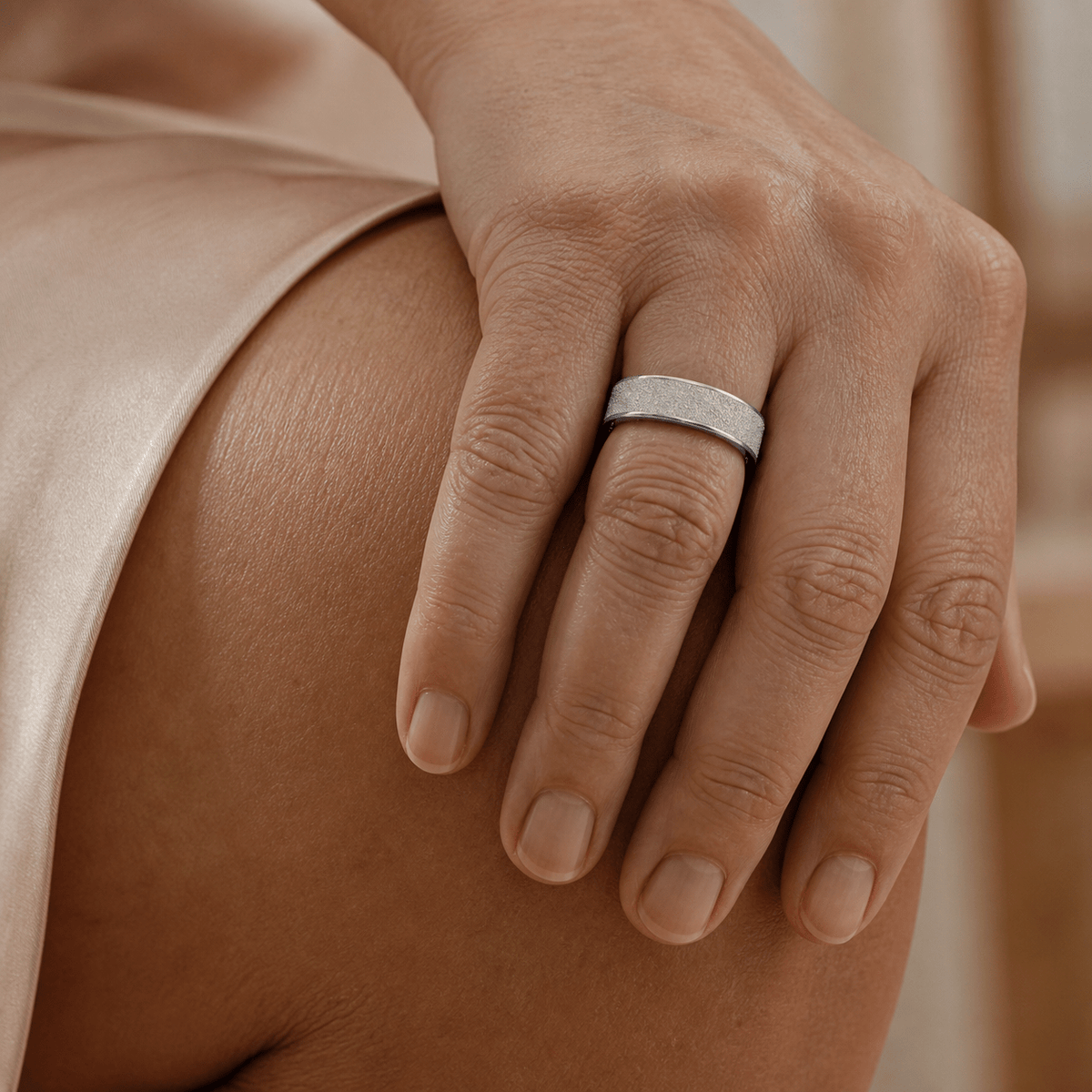
Para un aspecto menos decorativo, compare las opciones V3 Matte, R10, HR1, SR1 y de aspecto cerámico. Estos estilos pueden coordinarse más fácilmente con ropa de trabajo, equipo de ejercicio y joyas que ya tenga.
La comodidad depende de algo más que la apariencia. El ancho del anillo, el grosor, la forma interior, el peso y la ubicación del sensor pueden afectar la sensación del modelo. Un anillo visualmente discreto no es automáticamente el más cómodo para su dedo, por lo que el ajuste debe seguir siendo el factor decisivo.

Anillo inteligente de estilo clásico representativo que se muestra con un conjunto para el día a día.
¿Qué anillo inteligente Wrongduck tiene pantalla y alertas de vibración?
El anillo inteligente Wrongduck SY1 es la opción actual diseñada con una pantalla LED y alertas de vibración. Su listado de producto describe tres niveles de brillo LED y tres configuraciones de vibración, lo que ayuda a los usuarios a ajustar cómo se ve y se siente el anillo en diferentes situaciones.

SY1 mostrado con su pantalla iluminada; el soporte de notificaciones depende de la compatibilidad actual de la aplicación.
SY1 es el único modelo en la página combinada de anillos inteligentes Wrongduck descrito actualmente como compatible con pantalla LED y alertas de mensajes por vibración. No asuma que esas características están incluidas en otros diseños. Consulte el listado actual para conocer las aplicaciones compatibles, los requisitos del teléfono, el comportamiento de las notificaciones, las tallas disponibles y el rendimiento esperado de la batería.
¿Qué funciones de bienestar debe comparar?
Los modelos Wrongduck compatibles pueden ayudarle a revisar las tendencias de sueño, frecuencia cardíaca, oxígeno en sangre y actividad diaria a través de una aplicación complementaria. Algunos modelos individuales pueden incluir funciones adicionales, pero la disponibilidad de las funciones varía.
Utilice esta lista de verificación al comparar los modelos exactos que le gusten:
- ¿Qué información sobre el sueño y la actividad registra el modelo?
- ¿Su aplicación complementaria funciona con su teléfono iPhone o Android actual?
- ¿Con qué frecuencia debe sincronizarse el anillo con la aplicación?
- ¿Qué permisos y detalles de cuenta solicita la aplicación?
- ¿Qué autonomía de batería se indica para un uso normal?
- ¿Se incluye un estuche de carga o el modelo utiliza un cable de carga?
- ¿Qué exposición al agua se permite específicamente en el manual del producto?
Nota de salud: Los anillos inteligentes Wrongduck están destinados al bienestar general y al seguimiento del estilo de vida. Sus lecturas y tendencias no son diagnósticos médicos y no deben reemplazar a un dispositivo médico autorizado ni a la atención profesional.
Las funciones principales compatibles se ofrecen actualmente sin una cuota de suscripción mensual de Wrongduck. Esto no garantiza que todos los servicios opcionales de terceros, los costes de datos móviles o las futuras funciones sean siempre gratuitos. Lea los términos actuales del producto y la aplicación antes de realizar la compra. Para obtener una explicación más amplia, consulte nuestra guía de suscripción de anillos inteligentes.
Cómo elegir la talla correcta de anillo inteligente
Un anillo inteligente debe sentirse lo suficientemente seguro para mantener el contacto con el sensor sin causar dolor, entumecimiento, hormigueo o marcas persistentes. El tamaño de su dedo puede cambiar con la temperatura, la hidratación, el ejercicio y la hora del día, así que mida más de una vez.
- Elija primero el diseño que desea.
- Utilice la tabla de tallas para ese modelo exacto.
- Mida el dedo previsto en diferentes momentos del día.
- Compruebe que el anillo pueda pasar por encima del nudillo sin ejercer una fuerza excesiva.
- Confirme la política de cambios o devoluciones actual antes de realizar el pedido.
Si su medida se sitúa entre dos tallas disponibles, la talla más grande suele ser el punto de partida más práctico, ya que un anillo demasiado pequeño puede no encajar o resultar difícil de quitar. La talla más grande debe seguir siendo lo suficientemente segura para el contacto con el sensor. Lea nuestra guía completa de tallas de anillos inteligentes para una verificación de ajuste más detallada.
Lista de verificación final de compra
- Estilo: ¿Disfrutará usando este acabado con regularidad?
- Talla: ¿Está disponible actualmente su talla medida para ese diseño?
- Funciones: ¿El modelo exacto admite las funciones que necesita?
- Teléfono: ¿La aplicación complementaria es compatible con su dispositivo y región?
- Batería: ¿La rutina de carga esperada es adecuada para usted?
- Agua: ¿Qué exposición permite realmente el manual del modelo?
- Privacidad: ¿Se siente cómodo con los permisos y los controles de datos de la aplicación?
- Términos de posventa: ¿Ha verificado la garantía actual, las devoluciones, los cambios de talla y las opciones de cargador de repuesto?
Para obtener más ayuda, compare la duración de la batería de los anillos inteligentes, aprenda qué significan realmente las clasificaciones de resistencia al agua de los anillos inteligentes o revise nuestra comparativa entre anillo inteligente y reloj inteligente.
Preguntas frecuentes
¿Qué anillo inteligente Wrongduck es el mejor?
No existe un único modelo mejor para todos. Elija según su estilo preferido, la talla necesaria, las funciones exactas admitidas, la compatibilidad con el teléfono, la rutina de carga y los términos actuales del producto.
¿Qué anillo inteligente Wrongduck recibe notificaciones?
SY1 es actualmente el único modelo en la página de productos de anillos inteligentes Wrongduck combinados descrito como con pantalla LED y alertas de mensajes por vibración. Confirme la compatibilidad actual con el teléfono y la aplicación antes de comprar.
¿Todos los anillos inteligentes Wrongduck realizan el seguimiento de la misma información?
No. Las funciones de seguimiento y las características de la aplicación pueden variar según el modelo. Compruebe la descripción y las imágenes del estilo exacto que seleccione.
¿Los anillos inteligentes Wrongduck requieren una suscripción?
La información actual del producto indica que las funciones principales de la aplicación complementaria no requieren una cuota de suscripción mensual de Wrongduck. Revise siempre el listado actual y los términos de la aplicación.
¿Debo elegir la talla de anillo inteligente más grande cuando estoy entre dos tallas?
La talla más grande suele ser el punto de partida más práctico, ya que un anillo demasiado pequeño puede no encajar o resultar difícil de quitar. Asegúrese de que la talla más grande proporcione un contacto seguro con el sensor y verifique la política de cambios actual.
¿Puede un anillo inteligente Wrongduck diagnosticar una condición de salud?
No. Los anillos inteligentes Wrongduck son productos de bienestar general y no deben usarse para diagnosticar, tratar, curar o prevenir ninguna condición médica.
Recomendación final
Comience eligiendo el estilo que sea más probable que use, luego filtre por talla. Después de eso, compare solo las funciones, la información de la batería, el método de carga, los requisitos de la aplicación y los límites de agua indicados para el modelo exacto. Si las notificaciones son su prioridad, mire el SY1; si el diseño inspirado en la joyería es lo que más le importa, comience con las colecciones decorativas; y si desea un acabado cotidiano más discreto, compare las opciones mate, metálicas y de aspecto cerámico.
Compare los estilos, colores y tallas disponibles de los anillos inteligentes Wrongduck actuales.
Compartir:
¿Cómo debe quedar un anillo inteligente? Guía de tallas de anillos inteligentes (2026)
Anillo inteligente con pantalla y vibración: ¿Es el Wrongduck SY1 adecuado para ti?