

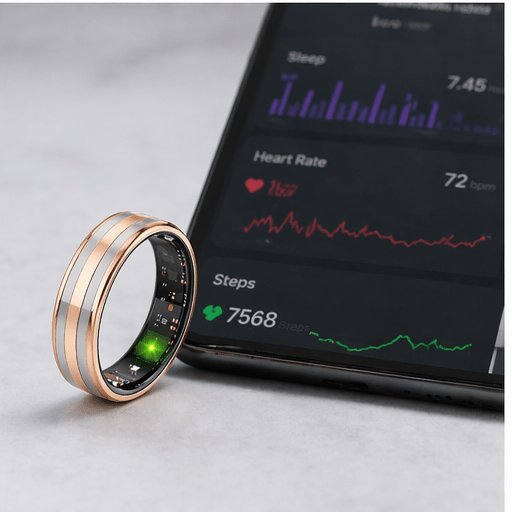
Most current smart rings are designed to last several days per charge, but there is no universal number. Official estimates for popular models range from about four days to more than a week, and actual runtime depends on the exact model, ring size, enabled features, syncing, battery age, and environment.
The practical answer is to compare the manufacturer’s estimate with your own full-charge cycle. This guide explains current examples, the factors that change battery life, charging time, and when a drop in runtime may indicate a problem.
How Long Does a Smart Ring Battery Last?
A reasonable category-level expectation is several days rather than one fixed 2–7 day promise. In current official examples, Samsung lists up to six or seven days depending on Galaxy Ring size, Oura lists different typical ranges by generation, and Ultrahuman lists four to six days for Ring AIR.
Those are manufacturer estimates, not a guarantee for every owner. “Up to” describes a best-case ceiling under specified conditions; “typically” describes an expected range that can still vary.

Current Smart Ring Battery Examples
Official specifications checked on August 5, 2026 show how widely the answer can vary:
- Samsung Galaxy Ring: up to six days for sizes 5–11 and up to seven days for sizes 12–15. Samsung says a full charge takes about 90 minutes.
- Oura Ring: Oura currently lists a typical six to nine days for Ring 5, five to eight days for Ring 4, and up to seven days for Generation 3. It lists approximately 20–80 minutes for a full charge, depending on the starting battery level.
- Ultrahuman Ring AIR: Ultrahuman lists four to six days on a full charge and approximately 180 minutes from 0% to 100%.
These examples are not a ranking. They illustrate why buyers should compare the exact generation, size, charger, and wording on the current product page. Specifications and software can change.
What Affects Smart Ring Battery Life?
Ring model and size
Different models use different batteries and power-management systems. Battery capacity can also vary by ring size; Samsung’s published Galaxy Ring figures are a clear example.
Enabled sensors and features
Continuous or frequent measurements, workout detection, blood-oxygen sensing, live readings, notifications, and experimental features can use additional power. The effect is model-specific.
Syncing and connectivity
Bluetooth communication and frequent app checks require energy. Connection problems may also trigger repeated syncing attempts. Use the manufacturer’s recommended phone, app version, and connection method.
Battery age and temperature
Rechargeable batteries are consumable components. Their maximum capacity gradually declines with age and charge cycles. Very hot or cold conditions can also affect performance and may damage the battery if they exceed the manufacturer’s limits.
Fit and usage pattern
Ring size can influence battery capacity, while a poor fit may affect sensor contact and the usefulness of the collected data. That does not mean a tighter ring improves battery life. Choose a secure, comfortable size according to the product guide.

How to Measure Real Smart Ring Battery Life
“Real usage” should mean your recorded result, not an unsourced average from other buyers. Use this simple method:
- Update the ring firmware and companion app.
- Charge the ring to 100% with the correct charger.
- Note the date and time, ring size, enabled features, and phone model.
- Use the ring normally without changing settings during the cycle.
- Record when the battery reaches the manufacturer’s recommended recharge level; do not deliberately run it to 0% if the care guide advises against that.
- Repeat for two or three cycles and compare the results.
A single short cycle may be caused by a firmware update, unusually heavy feature use, a connection issue, or temperature. Repeated results under similar conditions are more informative.
How Often Should You Charge a Smart Ring?
Charge based on the model’s instructions and your routine rather than a universal “two or three times per week” rule. A ring rated for four days and a ring rated for nine days naturally need different schedules.
Convenient charging moments may include showering, desk work, or another time when you already remove the ring. However, only place a dry ring on a dry charger, and follow the manufacturer’s water and charging safety instructions.
Do not confuse charger type with charge speed. A charging case, dock, or magnetic cradle can improve convenience, but the full-charge time still depends on the ring, current battery level, power source, and temperature.

How to Help a Smart Ring Battery Last Longer
- Follow the model-specific guide. Charging recommendations differ, so do not apply one brand’s percentage rules to every ring.
- Keep firmware and the app current. Updates may include battery-performance improvements.
- Avoid extreme temperatures. Use the limits stated by the manufacturer.
- Use the correct charger and power source. An incompatible charger can cause poor charging or safety problems.
- Do not leave a wet ring on the charger. Dry the ring, contacts, and charger first.
- Review high-drain features. If runtime suddenly falls, check what changed before disabling features you actually need.
- Prepare for storage. If you will not use the ring for weeks, follow its storage-charge and power-saving instructions.
When Is Short Battery Life a Problem?
Consider troubleshooting when the ring repeatedly lasts far less than the current specification under ordinary conditions, shuts down unexpectedly, becomes unusually hot, will not charge, or loses a large amount of power while idle.
Start with the official support steps: confirm the charger and power source, clean and dry the charging surfaces, update the app and firmware, restart or reconnect only as instructed, and observe another normal cycle. Contact the manufacturer or seller if the problem continues.
Safety note: stop using and charging a ring that appears swollen, damaged, leaking, or unusually hot. Follow the manufacturer’s support and disposal guidance; do not try to open or replace a sealed battery yourself.
Smart Ring vs. Smartwatch Battery Life
A smart ring does not automatically outlast every smartwatch. Watches vary from feature-rich models designed for daily charging to endurance models designed for many days. Screens, GPS, cellular radios, workouts, always-on displays, and power modes all affect watch runtime.
Compare the exact devices under similar use, including overnight tracking and workouts. For a broader decision, read Smart Ring vs. Smart Watch.
Battery Checklist Before Buying a Smart Ring
- Check whether the estimate says “up to” or “typical.”
- Look for size-specific battery differences.
- Confirm full-charge time and whether the charger is included.
- Check which features reduce runtime.
- Review replacement-charger availability and warranty coverage.
- Confirm app compatibility and firmware support.
- Compare subscription costs separately from battery performance.
Wrongduck offers supported smart ring app access without a recurring Wrongduck membership fee. Battery estimates and charging methods vary across products, so compare the current listing for the exact ring you are considering.
Explore the current Wrongduck smart ring collection, read the complete smart ring buying guide, or use the fit and sizing guide.

Frequently Asked Questions
Do smart rings need daily charging?
Many current models are designed for several days of use, so daily full charging is often unnecessary. The appropriate schedule depends on the exact ring, settings, battery age, and manufacturer guidance.
How long does it take to charge a smart ring?
It varies substantially. Current official examples range from roughly 20–80 minutes for Oura to about 90 minutes for Galaxy Ring and around 180 minutes for Ultrahuman Ring AIR.
Why is my smart ring battery draining quickly?
Possible causes include enabled high-drain features, repeated syncing, a recent update, connection problems, extreme temperature, an incompatible charger, or normal battery aging. Compare repeated cycles and follow the model’s official troubleshooting steps.
Should I drain a smart ring battery to 0%?
Do not assume that a full discharge is helpful. Follow the manufacturer’s care instructions; some brands specifically recommend recharging before the battery reaches 0%.
Can a smart ring battery be replaced?
Many smart rings use sealed, non-replaceable rechargeable batteries. Check the warranty and repair policy for the exact model, and never try to open a damaged battery-powered ring yourself.
Final Answer
Expect several days per charge from many current smart rings, but use the exact model’s official range rather than a universal number. Size, features, syncing, battery age, and temperature can all change the result. Record two or three normal cycles to understand your own runtime and contact support if it repeatedly falls far below the current specification.
Partager:
Can You Wear a Smart Ring in the Shower? Waterproof Guide (2026)
Do Smart Rings Need a Subscription? Full Cost Breakdown (2026)